iPhone 12 Series
| Problem Description | Symptoms | Solution | Source |
|---|---|---|---|
| Bootlooping. | - Firmware flash may succeed but does not fix the problem. - Firmware flash may fail at 19% - May get error 4013. | - Commonly caused by the proximity sensor, if unplugging this fixes the problem it will need replaced. - Can also be caused by a bad charge port flex or battery. | |
| No backlight or low brightness. | Apple logo visible on start. | Proximity sensor determines brightness if auto brightness is enabled, sensor will need to be replaced. | |
| Stuck in recovery mode. | - Device was waterdamaged near the power button. - 3uTools flash succeeds but does not fix the issue. | Boot the phone with a DC Power Supply (or in a known good housing) & measure IO_BUTTON_SIDE_L_1V8_CONN for voltage. You want to measure for 1.8V. while the phone is booted. If you get something like 0.6V, then you most likely have an issue with PMIC. Also, measure the volume button lines for 1.8V. IO_BUTTON_VOL_DOWN_L_1V8_CONN IO_BUTTON_VOL_UP_L_1V8_CONN If you get a lower voltage, like 0.6V, then you have issue with PMIC. Run a jumper from PP1V8_S2 to the lines stuck on a LOW state. So if you measured IO_BUTTON_SIDE_L_1V8_CONN was stuck on 0.6V (instead of 1.8V), you can feed it the 1.8V it is expecting. Same for the volume button lines. 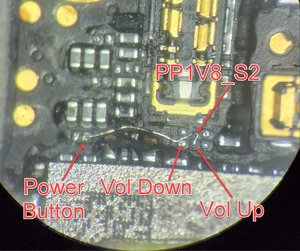 | Source |