PlayStation 5
| Problem Description | Symptoms | Solution | Source |
|---|---|---|---|
| No power. | - Ensure 12V is outputting at the PSU connector on the board. - Check for shorts around rear of southbridge IC CXD90061GG. This may indicate the IC itself is to blame. Replacements are available and they’re not married. - Plug your bench power supply into the 12v input pins. If you have no 300ma boot sequence, remove BIOS IC for 10-20 minutes completely from the board, resolder and retry. If still no change reprogram BIOS with a working digital edition copy of the BIOS (this will remove the ability to use a BDROM on disc editions) | Source | |
| No power. | - No beep - No lights - All voltages present - No blown fuses - 0A during sleep - 0A boot sequence | - In my case this was due to the dialog Southbridge power management IC (DA9065 aka RT5126) - Can also be caused by a dead Southbridge. - Worst case scenario the APU die may be cracked. | |
| No power. | Power button beeps roughly every 30 seconds | - Check fuse F7002 for continuity. If blown you may need to investigate why it went bad (possible short on nearby 5v-3.3v step down converter) - Check for shorts on 5v-3.3v step-down converter (TLV62090RGTR) directly opposite F7002 (APU side). The capacitor and IC appear to be common failures. - Check liquid metal for spills on and around the APU, as well as under the foam and gasket. - Check for shorts around the capacitors at the back of the WiFi/Bluetooth module (I had this issue and it was caused by a single capacitor here, so try removing the caps and testing for shorts before jumping to replacing the IC itself.) - Check for shorts around F7502 and F7003 - Check F7502 for continuity (If no, check caps in that area). | Source Source Source |
| No power. | Bothhand USA GST5009 short on bottom pins (differential pairs) to ground with 0.04ma-0.12ma current draw from bench supply before dropping to 0ma (12v inject @ PSU connector) | Dead Southbridge IC, reflow will not fix this issue. Will need to be replaced. | Source |
| Crashes while playing games. | Verify it isn’t being caused by overheating issues. | - Look for shorts around the Southbridge IC. - Can also be caused by the SSD controller. | |
| No display. | Black screen, no display detected. | Likely HDMI port. | |
| No display. | Signal detected but still black screen. | Try an HDMI port first but this is likely an HDMI encoder IC issue. | |
| Blue Light of Death (BLoD) | - Attempt OS reinstall. If that fails: - Check for any capacitor shorts near F7501, could be a PMIC. - This can also be caused by a defective HDMI encoder IC. - This could be a broken solder ball under the APU, you can increase pressure by adding washers to the bracket in order to test it. If it starts working after this then you will need to reball the APU. | Source Source | |
| Only boots into safe mode. | - Make sure the BDROM drive is correctly connected and receiving power via the power connector. - Make sure the BDROM ribbon cable is correctly connected. - Make sure the BDROM ribbon cable hasn’t been damaged. - Try rebuilding database and clearing software cache. - See SU-101312-8 solution. | Source | |
| SU-101312-8 Error During Reinstallation | - Check all solutions from “Only boots into safe mode.” problem. - If none of the above solutions work, your BDROM drive is not being recognized by the system. You’ll need to reprogram the BIOS to fool the console into thinking the system is a digital edition console. This will eliminate the BDROM check but it will obviously permanently lose BDROM functionality. | Source Source | |
| No boot, stuck in safe mode. Error SU-101265-5 when reinstalling firmware. | - May or may not also show RAM UART errors. - Update may fail around 27% | - Outside of the known “stuck in safe mode” solutions, this one user was able to solve it by replacing RAM banks 2, 4, and 5. - They were able to install the update and boot after replacing bank 5, but it was unstable. The issue was finally resolved after also replacing 2 and 4. | Soure |
| System reinstallation keeps failing | - See above “Only boots into safe mode.” and “SU-101312-8 Error During Reinstallation.” solutions first. - If none of the above solutions work, replace the SSD controller IC (CXD90062GG) | Source Source | |
| 3 Beeps of Death | Beeps happen when plugging in the console. | BIOS IC is bad and will need replaced, you will need to copy data over for disk drive edition consoles or you will lose BDROM functionality permanently. | Source & Tutorial |
| 3 Beeps of Death | Beeps happen when pressing the power button. | - Replace LED strip flex cable. - If that does not fix the issue then the BIOS IC is bad like in the previous issue. | Source & Tutorial |
| ”Too many USB devices connected” error message. | - Check for physically damaged USB ports. - If that checks out: BD82044FVJ provides power to the USB ports. According to the datasheet, pin 5 is pulled low if an error occurs. You can verify the issue by checking for shorts around this IC. In the source provided this was caused by a specific cap by the regulator but it is possible there are other causes, including the regulator itself. 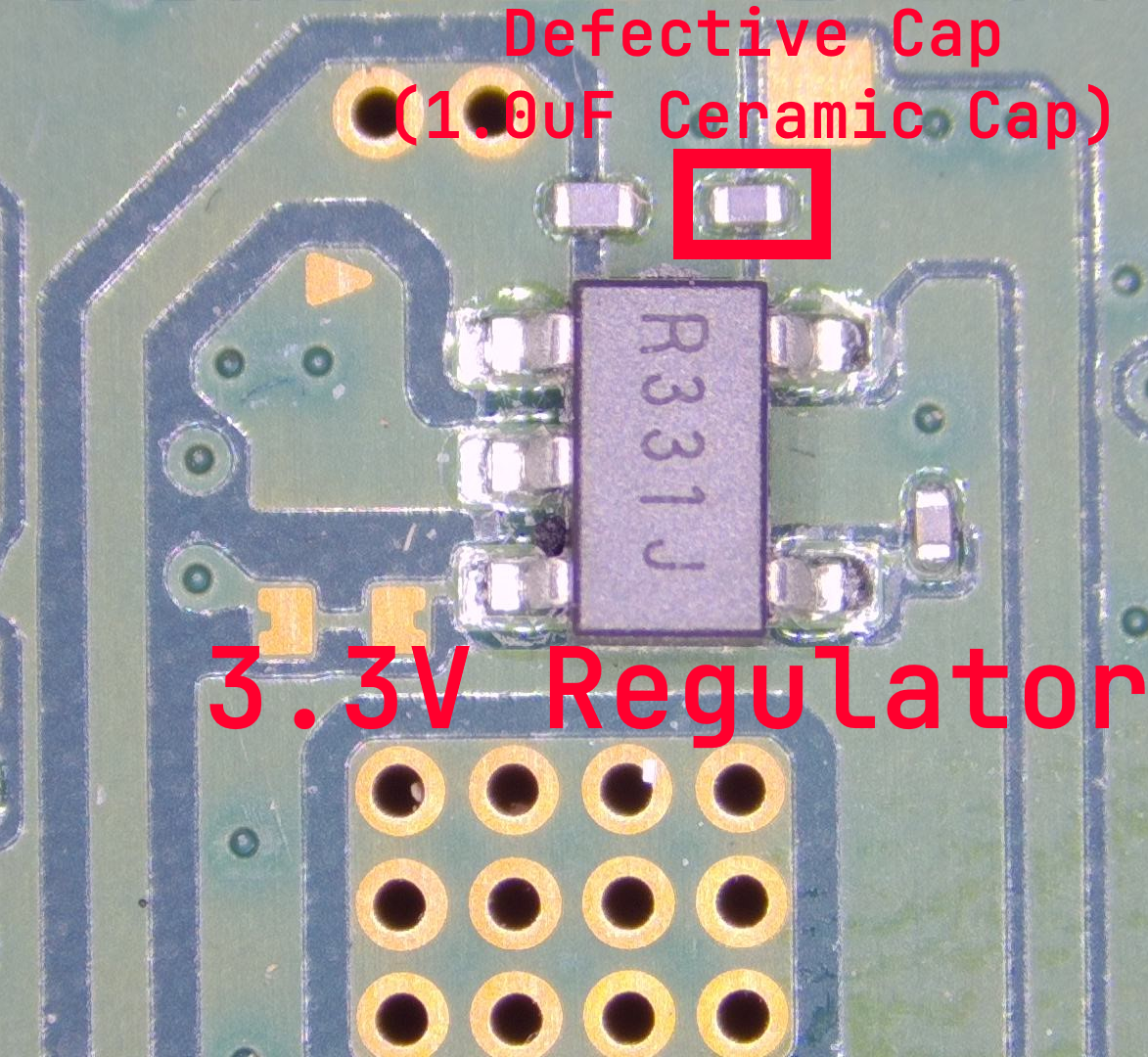 | Source Datasheet | |
| Display artifacting, red blocks or lines. | Displays normally when in safe mode. | - This is commonly an APU issue, but in some instances can be caused by the HDMI encoder IC. This can also be caused by the HDMI port, where the pins running to the encoder IC have been damaged or disconnected. - If the above doesn’t fix the issue, try pressing down on the APU heatsink while it’s booting and see if the issue persists. If it does not, then the issue is likely a cracked solder ball under the APU and it will need reballed or reflowed. - If none of the above work, the issue is likely a faulty APU. |
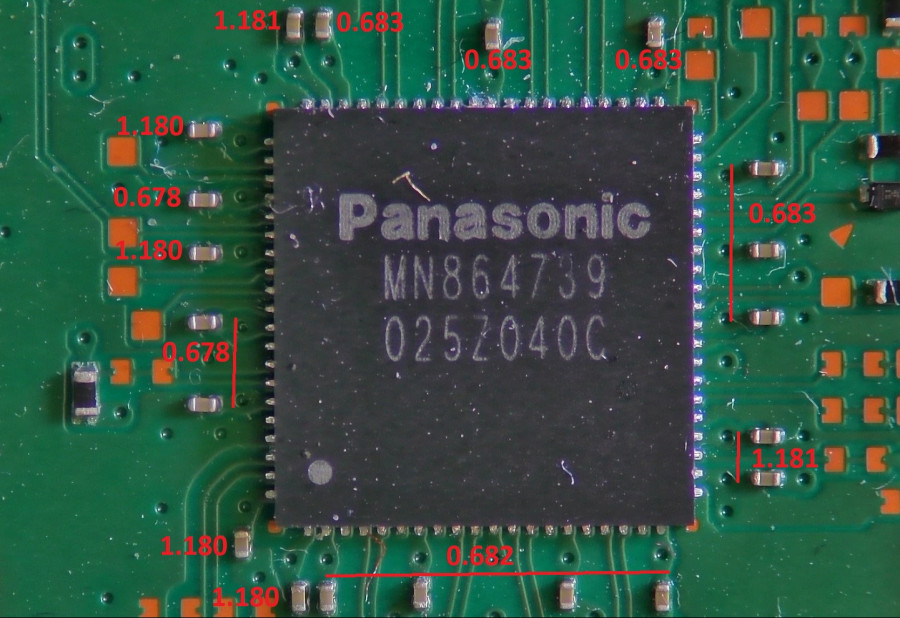
HDMI Encoder IC Diode Readings
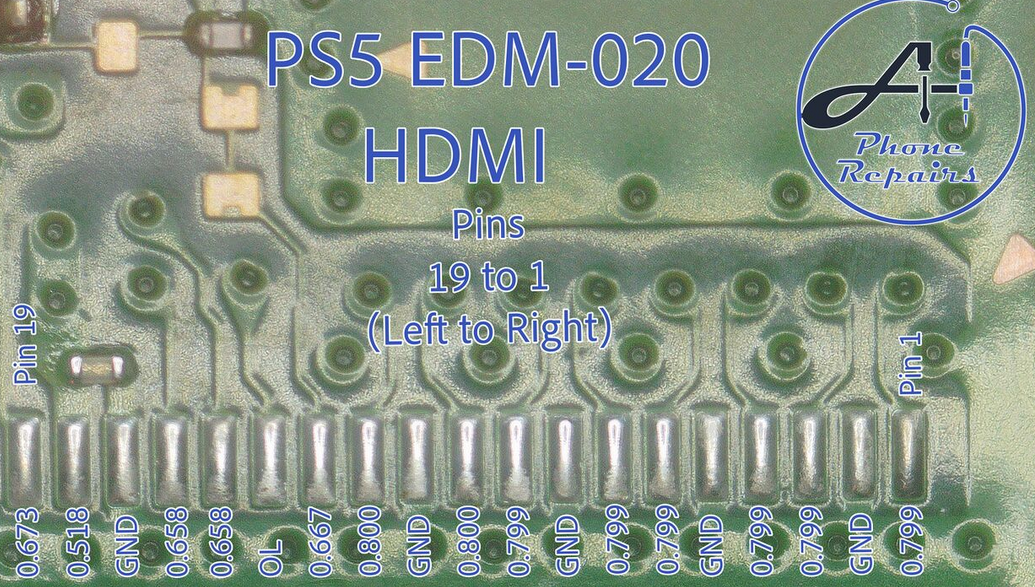
HDMI Port Diode Readings
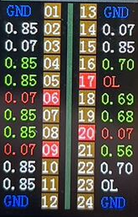
Good Tail Insertion Tester Reading
PS5 Boot Sequences (Created by TheCod3r)
| Indication Of | Power Stage | Sleep | Info |
|---|---|---|---|
| All Rails Present | 310ma | 7ma | Should attempt to turn on |
| Faulty BIOS | 0ma | 0ma | Flash BIOS (with matching S/N if possible) |
| Blown F7003 fuse | 0ma | 0ma | Check F7003 for continuity |
| Bad SSD or controller | 225ma | 7ma | Check SSD ICs and controller for L/D or reflow. Possibly bad controller IC |
| Bad F7002 or shorted SBV (TLV62090) circuit | 275ma | No Sleep | Check for shorts around F7002 or blown F7002 fuse |
| Shorted 3.3v rail above SBV (TLV62090) IC | 315ma | No Sleep | Check for shorts around WiFi IC/HDMI encoder or inject voltage into inductor above SBV IC (F7002 area) |
| Shorted WiFi IC | High current draw (5a in my case) | No Sleep | Check for shorts around capacitors behind WiFi IC |
| Blown F7001 fuse | 58ma | 7ma after 20 seconds | Check F7001 fuse for continuity. Check Left caps near SBV @ F7502 for short to ground. |
| Shorted inductor around DA9065 | 5ma | No Sleep | Check bottom left inductor next to DA9065 (near F7003) for short to ground. Likely cause would be bad IC or Southbridge |
| Shorted inductor around DA9065 | 5ma for 1 second | 0ma | Check top left inductor next to DA9065 (near F7003) for short to ground. Likely cause would be bad IC or Southbridge |
| Blown F7502 fuse | 24ma | 7ma after 10-20 seconds | Check for continuity on F7502 |
| 12v missing while plugged in | 0ma | 0ma | Check power supply or short to ground on 12v main input |
| Shorted 1.1v rail | Pulsing between 7ma and 12ma | Continuous pulsing | Check for short on bottom middle inductor behind Southbridge. Possible bad Southbridge or shorted cap behind Southbridge |
| Shorted 2v rail | 35ma | No Sleep | Check for short on 2v rail (back of board, bottom inductor near middle left SBV IC) |
| Shorted SOP-23 behind HDMI encoder | 5ma | No Sleep | Check for shorted SOP-23 IC behind MN864739 HDMI encoder. Could be a bad component or a bad HDMI encoder |
| Bad Southbridge most likely caused by power surge on ethernet port | 7ma | No Sleep | Check for shorts on Bothand Magnetics Module (below ethernet port) for shorts. If short on any pin to ground replace Southbridge |
RAM Banks (Labeled Order)
